DrivePair Adapter
Upgrade Your Drive With Seamless Wireless Connectivity
Your Car Is Ready.
Your Phone Should Be Too.
Turn your compatible wired CarPlay or Android Auto system into a seamless wireless experience—so you can connect automatically and drive without the cable clutter.
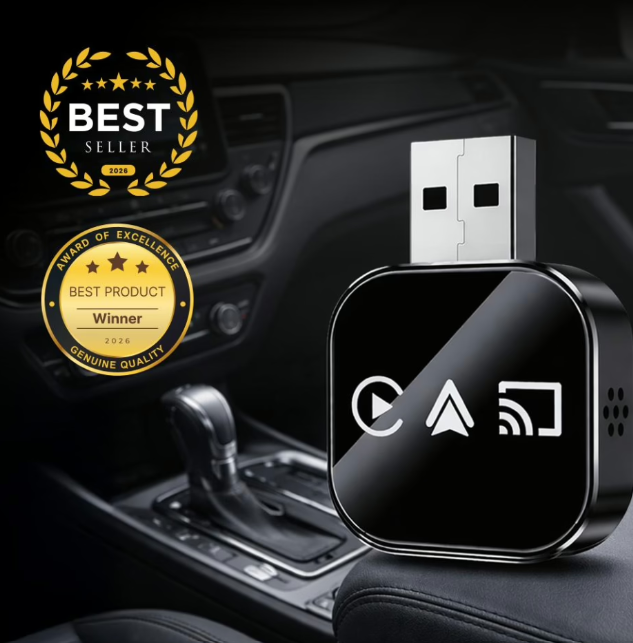
DrivePair Adapter: Make Every Drive Wireless.
Driving has become more connected than ever. Navigation, music, phone calls, messages, and other smartphone features are now a regular part of the modern driving experience. Apple CarPlay and Android Auto make these features easier to access through a vehicle’s infotainment display, but there is still one small inconvenience that many drivers deal with every day: connecting a cable.
Before every drive, you may need to find your charging cable, connect your smartphone, and wait for the vehicle to recognize it. A cable can also become loose, get tangled, or disconnect during a journey. For drivers who use CarPlay or Android Auto regularly, these small inconveniences can become frustrating over time.
DrivePair Adapter is designed to provide a simpler alternative. It converts compatible factory-wired Apple CarPlay and Android Auto systems into a wireless connection, allowing your smartphone to connect without needing to plug in a cable every time you drive.
With support for both iPhone and Android, 5GHz Wi-Fi, Bluetooth 5.0, automatic connection, and a compact plug-and-play design, DrivePair is built around one simple idea: plug it in once and enjoy a more convenient wireless driving experience.
What Exactly Is DrivePair Adapter?
DrivePair Adapter is a compact wireless solution designed to make compatible wired CarPlay and Android Auto systems more convenient for everyday driving.
If your vehicle already supports factory-wired Apple CarPlay or Android Auto, DrivePair is designed to work with that existing system. Instead of connecting your smartphone directly to the vehicle with a cable each time, the adapter acts as the wireless connection between your phone and the vehicle.
The setup is designed to be straightforward. Connect the adapter to the vehicle's USB port, pair your smartphone once, and then the phone is designed to connect automatically during future drives.
DrivePair supports both iPhone and Android devices, making it a flexible option for drivers using either Apple CarPlay or Android Auto.
The adapter also uses 5GHz Wi-Fi and Bluetooth 5.0. These technologies are designed to provide a fast and stable connection while helping reduce lag and unexpected disconnections.
Another important part of its design is that it does not require complicated installation. There is no need to replace your vehicle's existing infotainment system or make permanent modifications. Simply plug the adapter into the appropriate USB port and complete the initial pairing process.
DrivePair also includes a USB-C adapter, providing additional flexibility for vehicles that use newer USB-C connections.
With compatibility across more than 600 vehicle models, the adapter is designed to provide a convenient wireless solution for a wide range of compatible vehicles.
Why Should You Choose DrivePair Adapter?
Less cable handling. Less hassle. A simpler way to connect your compatible smartphone to your vehicle every time you drive.
Convenience That Starts When You Start the Car
The biggest reason to choose DrivePair is convenience. A wired connection can work perfectly well, but it requires you to physically connect your smartphone every time you want to use CarPlay or Android Auto. If you drive several times a day, this repeated process can become unnecessary and annoying.
DrivePair is designed to remove that extra step. After the initial setup, your smartphone is designed to connect automatically when you start your vehicle.
Automatic Connection
The connection typically takes around 5 to 10 seconds, allowing you to access compatible smartphone features without searching for a cable.
Everyday Simplicity
Get into your vehicle with your phone already in your pocket, start the car, and allow DrivePair to establish the wireless connection.
Keep Your Controls
DrivePair is designed to retain your existing compatible steering wheel controls, touchscreen functions, physical knobs, and Siri.
iPhone + Android
The same adapter is designed to support compatible Apple CarPlay and Android Auto systems, making it useful for different smartphone platforms.
DrivePair does not aim to replace your factory system. Instead, it is designed to make the existing wired connection wireless.
This can also be useful for families or households where different people use different smartphone platforms. Whether you use an iPhone or Android smartphone, DrivePair is designed to support compatible CarPlay and Android Auto systems.
How Well Does DrivePair Adapter Work?
DrivePair is designed around Bluetooth 5.0 and 5GHz Wi-Fi to create a wireless connection between your smartphone and a compatible vehicle system.
Bluetooth is used as part of the connection process, while 5GHz Wi-Fi provides the wireless communication needed for the CarPlay or Android Auto experience.
The use of 5GHz Wi-Fi is intended to offer faster and more stable connectivity compared with older 2.4GHz wireless adapters. A reliable connection is especially important when using navigation, streaming music, making calls, or interacting with other compatible features.
One of the key features is automatic connection. After the initial pairing, your smartphone is designed to connect automatically when you start the vehicle.
Ready When You Start Driving.
The typical connection time is approximately 5 to 10 seconds after the initial pairing.
Pair your smartphone initially instead of repeating the process before every journey.
No complicated installation procedures or vehicle modifications are required.
Leave the adapter connected to your vehicle and use your smartphone wirelessly.
Designed for a wide range of vehicles with factory-wired CarPlay or Android Auto.
For compatible vehicles, the purpose is straightforward: take the existing wired experience and remove the need for a physical connection between the phone and vehicle.
What Are the Benefits Of Using DrivePair?
DrivePair brings together practical wireless features designed to make your existing CarPlay or Android Auto experience simpler, cleaner, and more convenient.
Wireless CarPlay & Android Auto
↗The adapter is designed to support both compatible Apple CarPlay and Android Auto systems, allowing iPhone and Android users to enjoy wireless connectivity.
Automatic Connection
↻Once your smartphone has been paired, DrivePair is designed to connect automatically whenever you start your vehicle. The connection typically takes approximately 5 to 10 seconds.
5GHz Wi-Fi + Bluetooth 5.0
5GThe adapter combines these wireless technologies to provide a faster and more stable connection experience while helping reduce lag and unexpected disconnections.
No More Daily Cable
×Instead of plugging your smartphone into your vehicle before every journey, DrivePair allows the phone to connect wirelessly after the initial setup.
Compact Hideaway Design
◆Its compact form allows it to remain discreetly connected to the vehicle without creating unnecessary clutter around the center console.
USB-C Adapter Included
USBA USB-C adapter is included, providing compatibility options for vehicles using newer USB-C ports.
No Installation Required
✓DrivePair is designed as a plug-and-play accessory. There is no need to modify your vehicle or install complicated hardware.
Existing Controls Remain Available
⌁The adapter is designed to retain compatible factory controls, including steering wheel controls, touchscreen functions, knobs, and Siri.
600+ Vehicle Compatibility
600+DrivePair is designed to work across more than 600 vehicle models with compatible factory-wired CarPlay or Android Auto.
These features all focus on the same goal: making your existing vehicle technology easier and more convenient to use.
How Do You Use DrivePair Adapter?
Getting started with DrivePair is designed to be simple. Connect it, pair your smartphone, and you're ready to drive wirelessly in just three basic steps.
Plug It In
Connect DrivePair Adapter to your vehicle's USB port.
If your vehicle uses a USB-C port, you can use the included USB-C adapter.
The adapter is designed to work with your vehicle's existing compatible system.
Pair Your Smartphone
Once the adapter is connected, follow the pairing prompts shown on your vehicle's display.
Once your smartphone has been paired, the adapter is designed to remember the connection for future drives.
Drive Wirelessly
That's it. After the initial setup, your phone is designed to connect automatically whenever you start the vehicle.
This allows you to access compatible CarPlay or Android Auto features without plugging in your smartphone manually.
The entire purpose of the setup is to make the process simple: plug in once, pair once, and enjoy wireless connectivity during future drives.
Is DrivePair Compatible With Your Car?
DrivePair supports more than 600 vehicle models, but your car must meet one important compatibility requirement before using the adapter.
Factory-Wired CarPlay or Android Auto
Your vehicle needs to already support factory-wired Apple CarPlay or Android Auto.
Converts the existing wired connection into a wireless experience.
DrivePair is designed to convert an existing wired CarPlay or Android Auto connection into a wireless one. It is not designed to add CarPlay or Android Auto to a vehicle that does not already support the compatible wired system.
600+ Vehicle Models
Designed to support a wide range of compatible vehicles.
USB-C Ready
Includes a USB-C adapter for newer vehicle connections.
Keep Your Factory System
No need to replace your screen or install a new infotainment system.
Everything stays familiar.
For compatible vehicles, DrivePair is intended to work with the controls you already use every day.
If your vehicle already has a compatible factory-wired system, DrivePair is designed to make that connection wireless.
DrivePair Adapter Frequently Asked Questions
Find quick answers to common questions about compatibility, setup, connection speed, controls, and everyday use.
Everything you need to know before connecting DrivePair to your vehicle.
01 How fast does DrivePair connect?
After the initial pairing, the adapter is designed to connect automatically when you start your vehicle. The typical connection time is approximately 5 to 10 seconds.
02 Does DrivePair work with both iPhone and Android?
Yes. DrivePair is designed to support compatible Apple CarPlay and Android Auto systems, allowing it to work with both iPhone and Android smartphones.
03 Will DrivePair work with my vehicle?
DrivePair is designed to support more than 600 vehicle models. Your vehicle must already have factory-wired Apple CarPlay or Android Auto for the adapter to work as intended.
04 Do I need the USB-C adapter?
If your vehicle uses a USB-C connection, the included USB-C adapter can be used. If your vehicle already has the appropriate USB connection, you may not need it.
05 Will my steering wheel controls still work?
DrivePair is designed to retain compatible existing vehicle controls, including steering wheel controls, touchscreen functions, knobs, and Siri.
06 Is there audio lag?
DrivePair uses 5GHz Wi-Fi and Bluetooth 5.0, which are designed to provide faster and more stable connectivity while helping reduce lag and random disconnections.
07 How difficult is the setup?
The setup is designed to be plug and play. Connect the adapter, pair your smartphone using the vehicle's display, and then use the wireless connection during future drives.
08 Do I need to install an app?
DrivePair is designed as a plug-and-play solution without complicated setup requirements or the need for regular firmware updates.
09 What happens if DrivePair does not work for me?
The product comes with a 30-day money-back guarantee. If you are not satisfied, you can return the package and receive a full refund according to the stated guarantee.
Is DrivePair Adapter Worth Considering?
A simple wireless upgrade for drivers who already have compatible factory-wired CarPlay or Android Auto.
Remove the cable. Keep the experience.
For drivers who already use factory-wired Apple CarPlay or Android Auto but want to eliminate the daily cable routine, DrivePair Adapter offers a simple wireless alternative.
Designed to connect automatically after the initial setup.
Supports compatible Apple CarPlay and Android Auto systems.
Built around modern wireless connectivity technology.
Designed for a wide range of compatible vehicles.
One setup. Less daily hassle.
DrivePair is designed to let you keep the vehicle controls and infotainment system you already know, including compatible touchscreen functions, steering wheel controls, knobs, and Siri.
A more modern way to use your existing CarPlay.
Ultimately, DrivePair is focused on one simple improvement: making your existing CarPlay or Android Auto experience feel more modern by taking the cable out of the equation.
Disclaimer
This website is an independent promotional page created for advertising and informational purposes only. It is not the official website of the product manufacturer. We are not directly affiliated with, endorsed by, or officially connected to the brand owner.
The content provided on this page is intended to share general information, product details, and marketing insights based on publicly available sources. While we aim to provide accurate and up-to-date information, we do not guarantee the completeness, reliability, or accuracy of any statements presented.
Any trademarks, product names, logos, and brand images remain the property of their respective owners. If you wish to purchase the product, verify claims, or obtain official information, please visit the manufacturer’s official website.